Managing OVOC License Features
The License page displays the capacities for all managed entities. Licenses are allocated to tenants in the OVOC Web interface according to these capacities.
Ensure that the AudioCodes devices that are managed using OVOC (
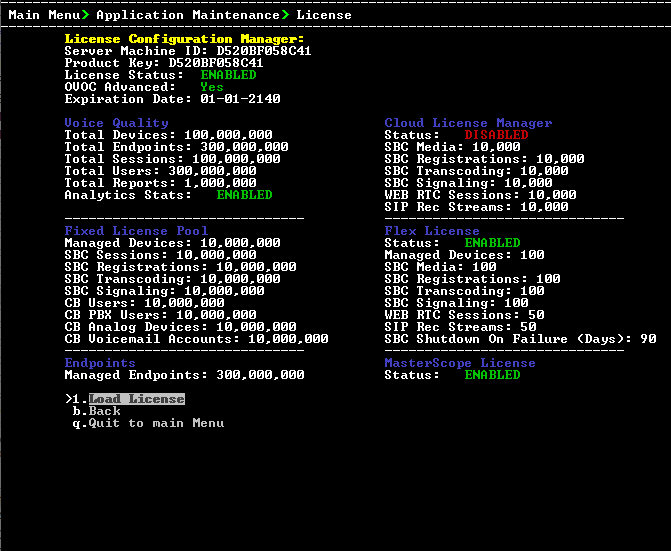
The table below describes the license categories.
|
License Type |
License Parameter |
||||||
|---|---|---|---|---|---|---|---|
|
Voice Quality |
|||||||
|
Total Devices |
The maximum number of Voice Quality monitored devices. |
||||||
|
Total Endpoints |
The maximum number of Voice Quality monitored endpoints. |
||||||
|
Total Sessions |
The maximum number of concurrent Voice Quality monitored SBC call sessions. |
||||||
|
Total Users |
The maximum number of Voice Quality monitored users supported by the SBC.
|
||||||
|
Total Reports |
The maximum number of customized Voice Quality reports that can be generated in OVOC.
|
||||||
|
analytics Stats |
Enables the analytics API feature for retrieving Voice Quality data from Northbound Database access clients. By default disabled when OVOC Advanced package is enabled. |
||||||
|
Cloud License Manager |
|||||||
|
SBC Media |
The maximum number of concurrent SBC media sessions. |
||||||
|
SBC Registrations |
The maximum number of SIP endpoints that can register with the SBC devices. |
||||||
|
SBC Transcoding |
The maximum number of SBC transcoding sessions. |
||||||
|
SBC Signaling |
The maximum number of SBC signaling sessions. |
||||||
|
SIP Web RTC Sessions |
The maximum number of SIP Web RTC Sessions. |
||||||
|
SIP Rec Streams |
The maximum number of SIP Rec streams. |
||||||
|
Flex License |
|||||||
|
Managed Devices |
The maximum number of devices that can be managed by the Flex license. Default-250 |
||||||
|
SBC Media |
The maximum number of concurrent SBC media sessions. |
||||||
|
SBC Registrations |
The maximum number of SIP endpoints that can register with the SBC devices |
||||||
|
SBC Transcoding |
The maximum number of SBC transcoding sessions. |
||||||
|
SBC Signaling |
The maximum number of SBC signaling sessions. |
||||||
|
SIP Web RTC Sessions |
The maximum number of SIP Web RTC Sessions. |
||||||
|
SIP Rec Streams |
The maximum number of SIP Rec streams. |
||||||
|
SBC Shutdown on Failure (Days) Default:-90 days |
When an SBC device does not receive acknowledgment from the OVOC server that Usage reports have been received within the specified grace period, then service is shutdown for this SBC device. The SBC must then re-establish connection with the OVOC server. |
||||||
|
Fixed License Pool |
|||||||
|
SBC Managed Devices |
The total number of SBC devices that can be managed by the Fixed License Pool. |
||||||
|
SBC Sessions |
The maximum number of concurrent license SBC call sessions |
||||||
|
SBC Registrations |
The number of SIP endpoints that can register with the SBC devices. |
||||||
|
SBC Transcoding |
The maximum number of SBC transcoding sessions. |
||||||
|
SBC Signaling |
The maximum number of SBC signaling sessions. |
||||||
|
CB Users |
The maximum number of CloudBond 365 users |
||||||
|
CB PBX Users |
The maximum number of PBX users. Currently not supported. |
||||||
|
CB Analog Devices |
The maximum number of CB Analog devices. Currently not supported. |
||||||
|
CB Voicemail Accounts |
The maximum number of CB Voicemail accounts. Currently not supported. |
||||||
|
Endpoints |
|||||||
|
Managed Endpoints |
The maximum number of endpoints that can be managed by the Device Manager Pro. |
||||||
|
Masterscope |
|||||||
|
MasterScope License |
Enables Single Sign-on to the MasterScope network equipment analysis application from the OVOC Web interface. |
||||||